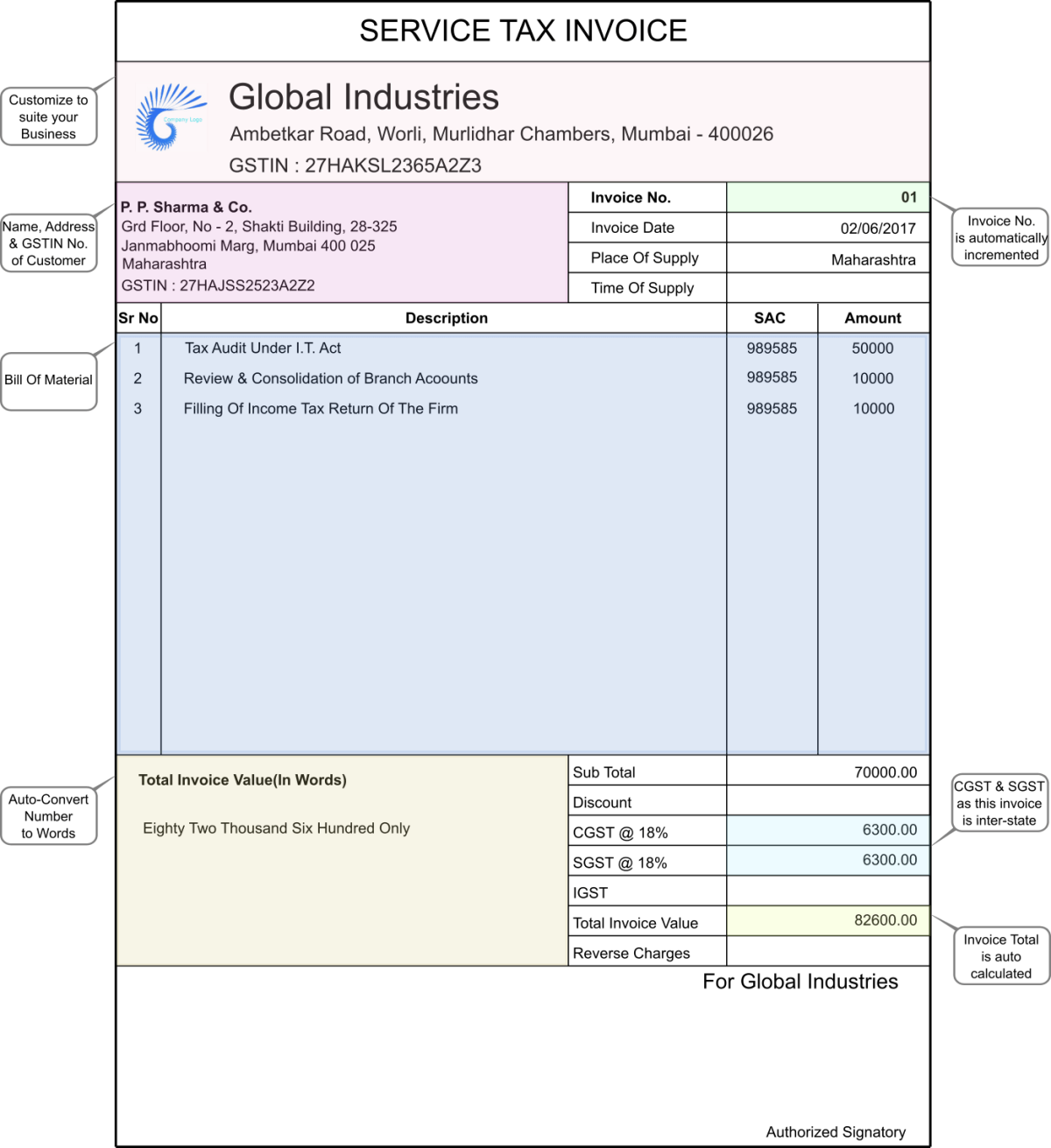
Free Invoice Generator Online 2025 - Create Professional Invoices Instantly
What is an Invoice Generator?
An invoice generator is an online tool that helps businesses create professional, GST-compliant invoices quickly without any accounting software. Perfect for freelancers, small businesses, and startups.
Why Use DocsAI Invoice Generator?
- ✅ 100% Free: No hidden charges, unlimited invoices
- ✅ GST Compliant: Includes all mandatory GST fields
- ✅ Professional Templates: Multiple designs available
- ✅ Instant PDF Download: High-quality PDF generation
- ✅ Custom Branding: Add your logo and colors
- ✅ Auto-calculations: Tax, discounts, totals calculated automatically
- ✅ Email Sharing: Send directly to clients
- ✅ Invoice History: Track all invoices in dashboard
- ✅ Payment Tracking: Mark as paid/unpaid
- ✅ Multi-currency: Support for INR, USD, EUR
Features of DocsAI Invoice Generator
1. Professional Templates
- Modern designs
- Customizable colors
- Company logo upload
- Multiple layouts
2. GST Compliance
- GSTIN field
- HSN/SAC codes
- CGST, SGST, IGST breakdown
- Place of supply
- Reverse charge mechanism
3. Smart Calculations
- Auto-calculate tax amounts
- Discount calculations
- Shipping charges
- Grand total
- Amount in words
4. Client Management
- Save client details
- Quick selection
- Billing history
- Payment reminders
How to Create Invoice Online
Step 1: Login to DocsAI.in
Step 2: Go to Business Tools → Invoice Generator
Step 3: Fill Your Business Details:
- Company Name
- GSTIN (if registered)
- Address
- Contact Details
- Logo (upload)
Step 4: Fill Client Details:
- Client Name
- GSTIN (if applicable)
- Billing Address
- Contact Information
Step 5: Add Invoice Details:
- Invoice Number (auto-generated)
- Invoice Date
- Due Date
- PO Number (if any)
Step 6: Add Items/Services:
- Item Description
- HSN/SAC Code
- Quantity
- Rate
- Tax Rate (5%, 12%, 18%, 28%)
Step 7: Add Additional Charges (if any):
- Shipping charges
- Packing charges
- Discount
Step 8: Add Payment Terms & Notes
Step 9: Preview Invoice
Step 10: Download PDF or Email to Client
Invoice Format - What to Include
Mandatory Fields (GST Invoice):
- 📌 Invoice Number (unique)
- 📌 Invoice Date
- 📌 Supplier Name, Address, GSTIN
- 📌 Buyer Name, Address, GSTIN
- 📌 HSN/SAC Codes
- 📌 Item Description, Quantity, Rate
- 📌 Taxable Value
- 📌 GST Rate and Amount (CGST/SGST or IGST)
- 📌 Total Amount
- 📌 Place of Supply
- 📌 Signature
Optional Fields:
- PO Number
- Due Date
- Payment Terms
- Bank Details
- Terms & Conditions
- Notes
Types of Invoices
1. Tax Invoice
Standard invoice with GST details for taxable supplies
2. Bill of Supply
For composition dealers or exempt supplies (no GST)
3. Proforma Invoice
Quotation/estimate before actual sale
4. Credit Note
For sales returns or price reductions
5. Debit Note
For additional charges after invoice
Invoice Numbering Best Practices
- 📝 Use sequential numbering (INV-001, INV-002)
- �� Include year/month (INV-2025-001)
- 📝 Never skip numbers
- 📝 Don't duplicate invoice numbers
- 📝 Maintain chronological order
Payment Terms Examples
- 💳 Net 30: Payment due in 30 days
- 💳 Net 15: Payment due in 15 days
- 💳 Due on Receipt: Immediate payment
- 💳 50% Advance: Half payment upfront
- 💳 2/10 Net 30: 2% discount if paid within 10 days
Benefits for Different Businesses
For Freelancers:
- Quick invoice creation
- Professional appearance
- Payment tracking
- Client management
For Small Businesses:
- GST compliance
- Inventory management
- Financial reports
- Multiple users
For Startups:
- Free to start
- Scalable solution
- Professional branding
- Easy accounting
FAQs About Invoice Generator
Q1: Is the invoice generator really free?
A: Yes, completely free with unlimited invoices on DocsAI.
Q2: Are the invoices GST compliant?
A: Yes, all mandatory GST fields are included automatically.
Q3: Can I add my company logo?
A: Yes, you can upload your logo and customize colors.
Q4: Can I edit invoice after creation?
A: Yes, you can edit and regenerate invoices anytime.
Q5: How do I share invoice with clients?
A: Download PDF and email, or use our direct email feature.
Q6: Can I track payment status?
A: Yes, mark invoices as paid/unpaid and track in dashboard.
Q7: Is my data secure?
A: Yes, all data is encrypted and stored securely.
Conclusion
Creating professional invoices is essential for every business. Use DocsAI's free invoice generator to create GST-compliant invoices in minutes!
Create invoice now: Free Invoice Generator
Last Updated: October 2025 | Reading Time: 7 minutes


Be the first to comment on this post!